
Colour Space
What is it and should you even care?
Colour Wheel of Primary and Secondary Colours
The concept of colour seems pretty straightforward, something that’s very easy to understand. But when you start to delve a bit deeper it can become a bit confusing, especially in relation to Photography.
When thinking about colour, the starting point for most people is the artist's colour wheel which defines Red, Blue, and Yellow as primary colours. Where two colours meet on the colour wheel, they mix to produce what are known as secondary colours - Orange, Purple and Green. When primary and secondary colours sit alongside each other from the opposite side of the colour wheel, they are known as complimentary colours, which appear to make each other more intense.
Light on the other hand is described in a different way. The Primary colours of light are Red, Green and Blue (RGB), which combine to create the secondary colours Cyan, Magenta and Yellow (CMY).
Colour Wheel of Primary and Secondary Colours (Light)
Digital cameras record colour entirely in the colour space of light, RGB. This RGB data only becomes relevant to traditional theories of colour at the print stage of the photographic process, which - to add to the confusion - is based on using CMY and K (black).
Deciding how to accurately convey colour in what’s known as a colour space throughout the journey from camera to print is therefore an important decision for photographers.
Or is it?
As with all photography related questions, the answer starts with "it depends…" In the case of colour, it depends firstly on the format the file is recorded as, and secondly on the intended output or medium in which the final image will be viewed.
All digital cameras have an in-camera option of two colour spaces; Adobe RGB and sRGB. So what’s the difference and which one should you use? To answer this question, the first thing to understand is that in a digital sense, colour is represented as a virtual, three-dimensional shape, known as a colour space. This shape defines the range of available colours, known as a gamut. Adobe RGB is a larger colour space than sRGB, which means it renders a wider gamut, useful for recording a wide variety of subtle shades of the same colour. Imagine a subject wearing a red jacket, drinking a can of Coke standing next to a post box with a double decker bus in the background. That’s a lot of different shades of red, so It would make sense to record all of those variations by selecting the larger Adobe RGB colour space.
However, it still depends on a couple of things… first of all, if you're shooting RAW files, the colour space setting in camera becomes irrelevant. RAW files capture the full sensor data without an assigned colour space. The choice of colour space is made at the output stage of image processing in editing software. Colour space settings in camera only apply to JPEGs that are generated in-camera, so if you’re shooting JPEG files and want to record a wide range of hues, Adobe RGB would be the best option.
Another factor that affects colour representation is known as BIT Depth, which I won’t go into here, but it’s worth mentioning that while most cameras record what is known as 8 BIT or True Colour which displays 16.7 Million colour tones, the human eye can only differentiate from 2M - <10M colour tones.
Compare the two images below, recorded on a Canon camera set to record both JPEG and RAW files simultaneously. Notice how the reds on the left JPEG image appear more as of a block of solid colour, with less variation in hue compared to the RAW file on the right.
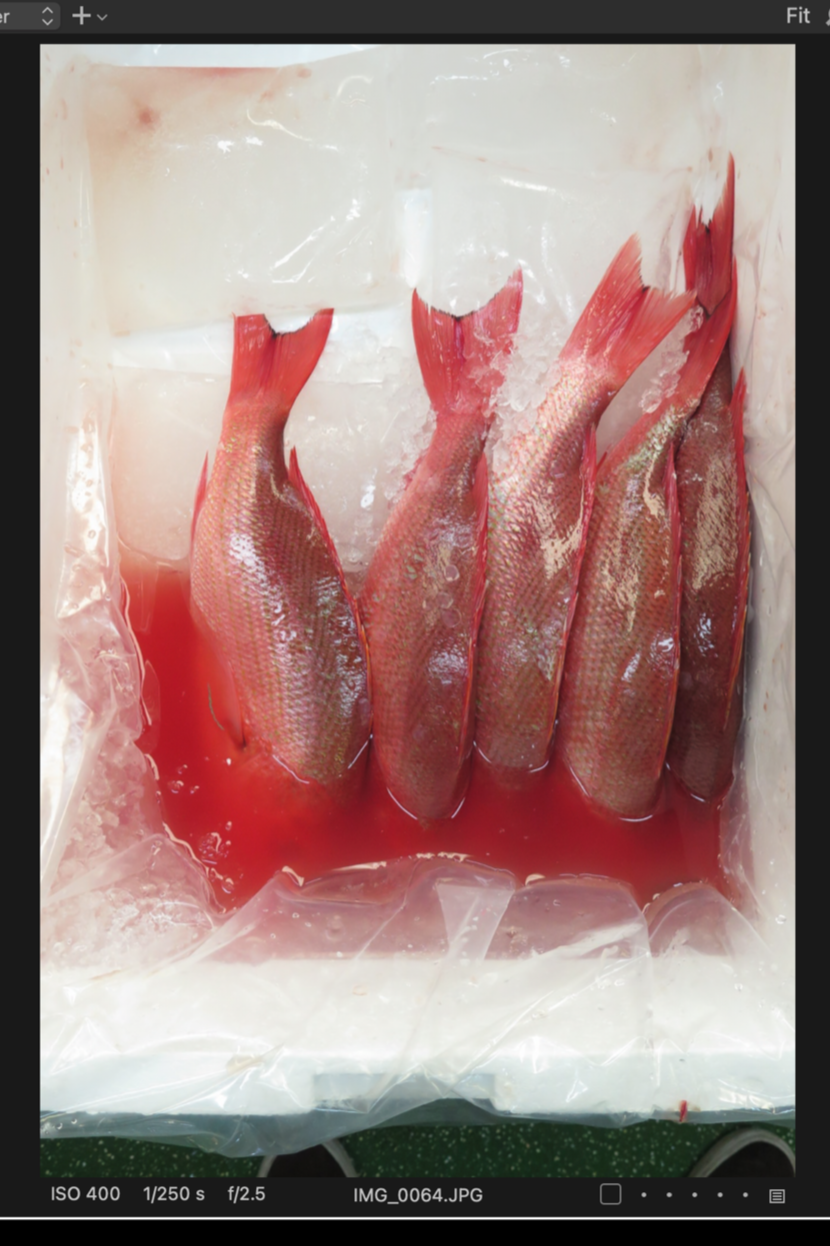
JPEG image recorded in sRGB Colour Space
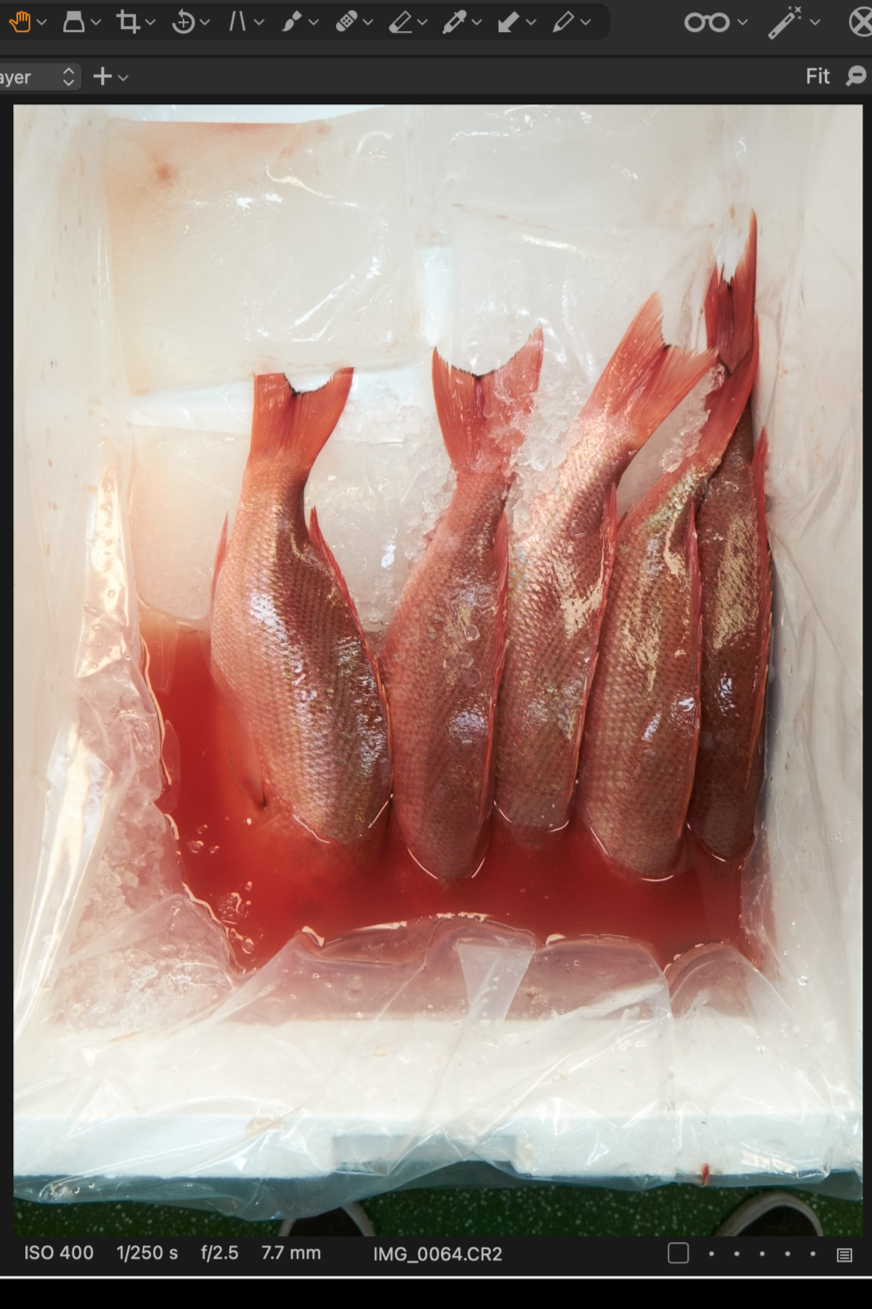
RAW image recorded with no Colour Space
The JPEG file recorded in the sRGB colour space reduces the shades of red to a more uniform hue, leaving the image flat and dull.
The next consideration is where the image will end up. Screens on digital devices are not all calibrated to render colour in the same way, so sRGB has become the universal default for all digital content. When an Adobe RGB file is displayed on an uncalibrated screen, the colours that fall outside the sRGB range get compressed, producing the result seen in the left hand image above.
It's important to note that while colours from an Adobe RGB colour space can be mapped onto the smaller sRGB colour space, the reverse is not possible - you cannot expand an sRGB file into the Adobe RGB colour space - you can’t recover colour information that wasn’t there to begin with!
So if the intended output is digital, sRGB is the best choice, even if the original file from the camera was record in Adobe RGB as a JPEG. If you intend to have your images professionally printed and want to render all those subtle colour variations, then the larger Adobe RGB colour space is the better option.
The general rule of thumb is to shoot RAW (which has no assigned colour space) or JPEG (with AdobeRGB) and then choose your colour space at the point of export - sRGB for anything going online or to screen, and Adobe RGB (typically as a TIFF file) for print.